How to Redeem Codes in RL Crate Simulator
Exact Settings → Redeem Code path, troubleshooting, and what to do when the active list is empty.
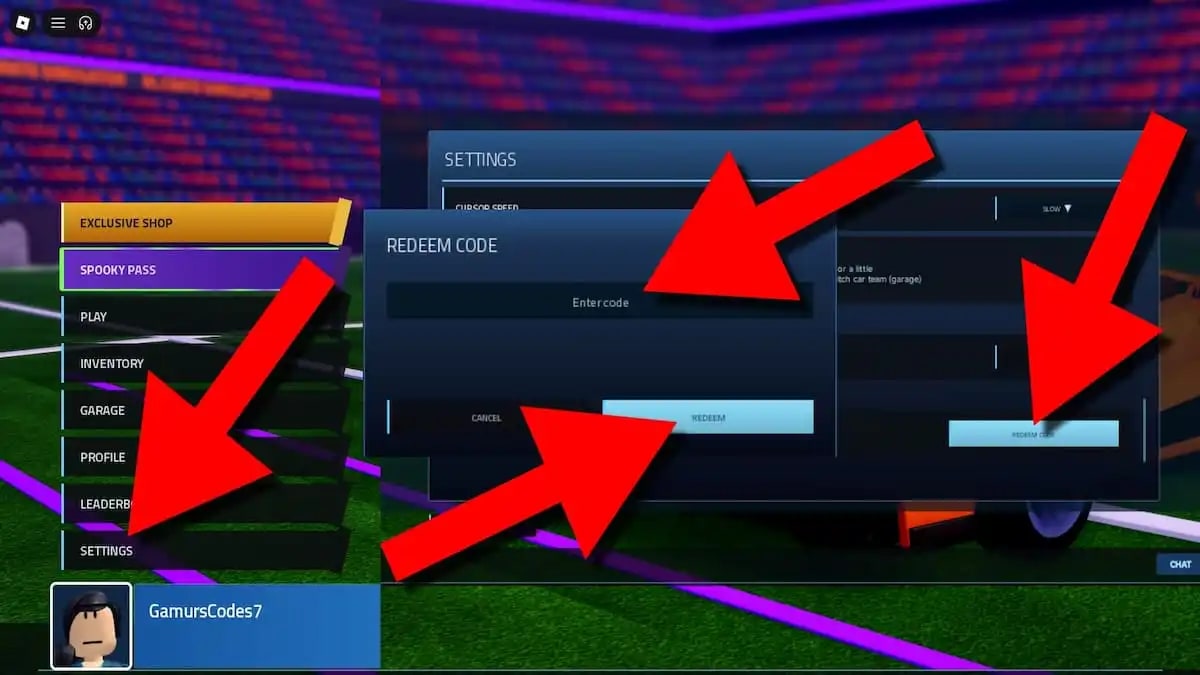
Promo codes are the loudest way players hunt free keys in RL Crate Simulator—and the easiest way to waste a session retrying dead strings. This walkthrough covers the exact redeem path, why codes fail, scam patterns to ignore, and what to grind instead when the active list is empty.
The canonical live table always lives on the Codes Hub. This page is the how-to and troubleshooting companion. For every non-code key source (favourite, group, tasks, trades), use How to Get Keys.
Current status (mid-November 2026)
There are no active codes after a November recheck (Destructoid coverage around Nov 2, 2026, plus a later mid-November verify). Expired or sold-out strings still circulating in search and chat include:
| Code | Status |
|---|---|
| TRADESERVER | Expired / sold out (large key bundle historically) |
| code1 | Expired |
| 200keys | Expired |
| WWW | Expired |
| 70CCU | Expired |
| RLCS | Expired |
If someone in a public server swears these “still work on a private build,” they are wrong or scamming. Bookmark Codes and only trust newly listed strings after studio drops.
Step-by-step: redeem a code
- Launch RL Crate Simulator from the Roblox place (Blue Bear Games Studio — place id 109406948015795).
- Look at the left side of the HUD and open Settings.
- Choose Redeem Code.
- Enter the code exactly as published—watch capitalization and avoid leading/trailing spaces.
- Press Redeem and wait for the confirmation toast.
- Check your key balance (and inventory if the reward is an item) before opening crates.
Codes are almost always one successful claim per account. Switching servers after a good redeem does not grant a second copy.
Mobile vs desktop notes
The Settings → Redeem Code flow is the same on touch and mouse clients. If the left menu is collapsed, expand the side panel first. After a place update, rejoin once so you are not redeeming on a stale server build.
Troubleshooting: code not working
Work the list in order—most failures are boring, not mysterious.
1. The code expired or sold out
Blue Bear Games Studio often ships short-lived or limited-claim promos. Once the pool empties, the string dies forever even if influencers still show old thumbnails. Compare against the Codes Hub active table. If the hub says none active, stop retrying TRADESERVER or RLCS.
2. Typo, spacing, or wrong capitalization
Paste when possible. Retype carefully if paste inserts a hidden character. Do not add spaces before/after. Mixed-case codes usually need the published casing.
3. Already redeemed on this account
One claim per account is the default. Alt accounts are a separate Roblox identity—never share passwords to “test codes.” If the UI implies you already claimed it, move on.
4. Stale server / place version
Leave the experience and rejoin so you land on the latest published place. The game was updated as recently as 11/8/2026; redeeming on an old instance can fail oddly after patches.
5. Wrong game
Confirm the title is RL Crate Simulator by Blue Bear Games Studio—not a copycat crate place with a similar name. Codes are experience-specific.
6. Platform / UI lag
Wait a few seconds after pressing Redeem. Soft-crash the client only after a clear error or zero feedback across two attempts.
Scam warnings (read before you type)
Event weeks and code droughts both attract predators:
- “Private working codes” for Robux or limiteds — real promos are free community drops, not paywalled DMs.
- Fake redeem websites asking for your Roblox password or cookie — never enter credentials off-platform.
- “Middleman will redeem for you” — there is no middleman step; only Settings → Redeem Code on your account.
- Recycled expired lists posted as “NEW Nov 2026 codes” without checking the hub — verify here first.
- Executor / script pitches that promise auto-redeem of secret banks — see Scripts for risk reality; scripts do not invent studio codes.
If a stranger needs your account to “apply a group code,” refuse. Group bonuses come from joining Blue Bear Games Studio, not from handing over a login.
What to do when no codes are active
Empty active tables are normal. Keep progress moving with systems that do not depend on promos:
- Favourite the game for +10 keys.
- Join the Blue Bear Games Studio group for bonus keys/XP.
- Clear daily, weekly, and Season 1 tasks (Season 1).
- Finish Spooky tasks while that UI remains (Halloween event).
- Trade duplicates across servers (Trading guide).
- Spend keys with a plan (Best crates, Tier List).
Deep dive: How to Get Keys. Day-one checklist: Getting Started.
After a successful redeem
- Screenshot the toast if you track earnings.
- Decide the spend before dopamine opens—cheap learning crates vs targeted Champions/RLCS vs event Collection.
- Favourite any accidental Titanium White / Black / Spooky / Frosted or Striker hits so trade-ups cannot eat them.
- Recheck Codes after the next Updates post; do not assume yesterday’s empty list is permanent forever—only that mid-November 2026 remains empty.
Related pages
- Codes Hub — live and expired tables
- How to Get Keys — non-code income
- Getting Started
- Guides Hub
- Updates Hub
Bottom line
Redeem path is simple: Settings (left) → Redeem Code → Enter → Redeem. Failures are usually expiry, typos, or already-claimed rewards—not a hidden second menu. Keep this guide for the mechanics, keep Codes for the truth table, and keep How to Get Keys for the grind that actually funds Season 1 when promos go quiet.
Frequently Asked Questions
Quick answers to the most common questions.
Where is the redeem code button in RL Crate Simulator?
Open Settings on the left side of the HUD, choose Redeem Code, type or paste the string, then press Redeem. Confirm the reward in your key balance.
Why does my code say it failed?
Most failures are expired or sold-out codes, typos/spacing, already-redeemed claims, or a stale server. Rejoin once, recheck the Codes Hub, and avoid retrying the expired list.
Are TRADESERVER or RLCS still working?
No. TRADESERVER, code1, 200keys, WWW, 70CCU, and RLCS are expired or sold out as of November 2026. Only brand-new codes listed on the Codes Hub are worth trying.
Can I redeem the same code on two accounts?
Each Roblox account typically gets one claim. You must own and play that account yourself—never share passwords so someone else can “redeem for you.”
What should I do if there are no active codes?
Favourite for +10 keys, join Blue Bear Games Studio for bonuses, clear Season and Spooky tasks, and trade duplicates. Follow How to Get Keys for the full non-code checklist.